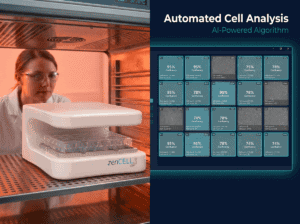
What is zenCELL owl and how does it work?+
zenCELL owl is a 24-channel brightfield incubator microscope that automates remote monitoring of cell cultures. It sits inside any standard CO₂ incubator on a shelf — at 18×18×10 cm and 1.5 kg it fits without modification. One USB-C cable connects it to your PC. The software captures images at defined intervals (minimum 1 minute) and performs automated confluency analysis, timelapse generation and data export — 24/7 in real time.
What microscopy technology does zenCELL owl use?+
zenCELL owl is based on inverted transmitted light (brightfield) microscopy. Each of the 24 integrated cameras has a 5MP sensor with 14x magnification and a field of view of 1.2 × 0.9 mm. The system captures high-resolution brightfield images without any fluorescence labels or sample preparation.
Can zenCELL owl do fluorescence imaging?+
No — zenCELL owl is a brightfield system and does not support fluorescence imaging. Due to the compact design integrating 24 cameras, fluorescence illumination is not technically feasible at this time. For all brightfield applications — confluency, migration, cytotoxicity, spheroids — zenCELL owl is a complete solution. If fluorescence is essential for your assay, we recommend evaluating whether a brightfield-only workflow is sufficient.
What are the PC system requirements?+
For a 10-minute imaging interval with all algorithms active: Windows 10 or 11 (64-bit), 2.5 GHz processor with 4 cores, 8 GB RAM minimum (16 GB recommended), SSD storage recommended for long-term experiments. USB-C / USB 3.0 port required. No internet connection needed after installation — your data stays local. The software calculates the minimum possible recording interval at the start of each experiment based on your PC performance.
What is the field of view and magnification?+
Each of the 24 cameras has a field of view of 1.2 × 0.9 mm at 14x magnification with additional digital zoom. The maximum focus range is 280 μm, adjustable in 1050 steps. Autofocus is fully automatic — one-time mechanical setup per plate type is required, after which the system focuses automatically at every imaging interval.
What is the minimum and maximum recording interval?+
The minimum recording interval is calculated automatically by the software based on your PC performance and the number of wells and algorithms selected. Typically 1 minute is achievable for a standard setup. The maximum adjustable interval is 24 hours. We recommend a 10-minute interval for most applications to balance data density with PC load.
Does zenCELL owl use WiFi or Bluetooth?+
No — zenCELL owl connects via a USB-C cable (included). Data transfer and power supply run through this single cable. Remote access to your cell cultures from outside the lab is possible via the zenCELL owl software on any networked PC — no WiFi module in the device itself is required.
Can the software perform statistical analysis?+
Yes. The software includes automated calculation of cell coverage (confluency %), cell count (adherent cells, detached cells, total), and standard deviation across wells and time points. All data exports as CSV or Excel for further analysis. Additionally, free ImageJ integration allows advanced custom analysis without vendor lock-in.
What is the cheapest Incucyte alternative for brightfield live cell imaging?+
zenCELL owl is the most cost-effective Incucyte alternative for brightfield live cell imaging — starting at €14,000 compared to ~€220,000 for Incucyte S3. That is over 90% cheaper. Furthermore, zenCELL owl has no annual licence fees, no mandatory subscriptions and no service contracts. Rental starts at €290/month. The system delivers comparable automated brightfield imaging, higher camera resolution (5MP vs 1.7MP) and a fraction of the footprint (1.5 kg vs ~45 kg).
Can I monitor cells without removing them from the incubator?+
Yes — that is exactly what zenCELL owl is designed for. The device sits inside your CO₂ incubator on any standard shelf. Cells are imaged continuously at defined intervals without ever opening the incubator door. As a result, cells remain in their optimal physiological environment throughout the entire experiment. This eliminates the temperature, CO₂ and humidity disruptions caused by conventional manual microscopy checks.
What is live cell imaging used for?+
Live cell imaging is used to observe living cells in real time — without fixation or labelling. Key applications include: confluency and proliferation monitoring (tracking how quickly cells grow and fill a vessel), scratch and wound healing assays (measuring cell migration rates), cytotoxicity assays (monitoring how cells respond to drugs over time), 3D spheroid imaging (tracking tumour model growth), and cell culture quality control (detecting contamination or morphology changes early). Compared to endpoint assays, live cell imaging provides continuous kinetic data throughout the entire experiment.
How does automated confluency measurement work?+
Automated confluency measurement uses image analysis algorithms to calculate the percentage of the well surface covered by cells at each time point. zenCELL owl software captures a brightfield image at your defined interval, then applies an AI algorithm to segment cell-covered areas from background. The result is a confluency % value per well per time point — automatically plotted as a growth curve. No manual counting, no subjectivity, no observer variability. Data exports as CSV for further statistical analysis.